


ProCleaner - Storage Cleaner
4.0358.00 Reviews
App Specs
- Version
- 1.2.1
- Updated On
- License
- Free
- Downloads
- 5,000,000+
- Developer
- Appsiko
- Categories
- Tools
- Platform
- Android
Screenshots
 Analysis by AppCompare
When my phone starts warning me that space is running low, I want a clear answer before I delete anything: what is taking up room, and what can I safely remove? That is the decision ProCleaner - Storage Cleaner is meant to help with. It is a free tools app from Appsiko, and its focus is practical rather than elaborate: make storage cleanup feel like a short task instead of a hunt through settings.
I would judge a cleaner like this by three things: whether it helps me identify removable clutter, whether I can review the suggested cleanup before committing, and whether it makes clear that a cleaner cannot replace sensible file management. ProCleaner looks most appealing when I want a quick starting point. It is less compelling if I want fine-grained control over every folder or expect an app to solve a storage problem caused by large videos, downloads, or apps I actively use.
Choosing a cleaner without risking useful files
The useful question is not simply how much space a scan reports. It is whether I understand what will be removed and whether I can keep anything I may need. Cache can often be rebuilt by the apps that created it, but a personal photo, downloaded document, or offline file may be much harder to replace. I treat any cleanup suggestion as a prompt to review, not as permission to erase everything automatically.
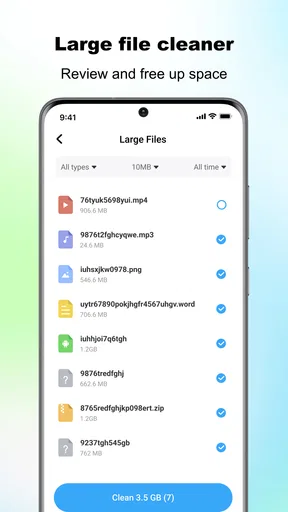
That distinction matters most when the phone is nearly full. A quick cleanup can be helpful, but it is not a substitute for deciding which large files are worth keeping. Before confirming a deletion, I would check that the selected items are genuinely disposable and that anything important is backed up or stored somewhere I can access.
Where the one-tap approach is useful
ProCleaner’s appeal is its low-friction approach: open a storage tool, scan, inspect the result, then choose whether to clean. That can suit someone who rarely checks storage settings and only notices the issue when a download fails or the phone asks for room. Rather than starting with a long manual search, the app gives the cleanup process a clear entry point.
It is also a reasonable fit for people who prefer a focused utility to a dashboard packed with unrelated tools. I would not expect a cleaner to make every phone feel faster or to keep storage free indefinitely. Its practical value is helping me spot removable clutter at the moment I need to make room; the benefit depends on what is actually using space on that device.
How it differs from built-in storage tools
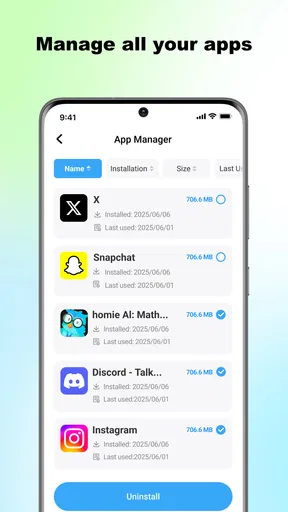
The usual alternative is the storage screen already included with the phone. That option can be a better choice when I want to inspect which apps, media, or downloads occupy the most room and manage them directly. It avoids adding another app to the device and can offer a more deliberate route for removing large items. ProCleaner makes more sense when I would rather begin with a dedicated cleanup workflow than browse those settings myself.
Worth Reading Before You Choose

EA SPORTS FC Mobile 26 Is a Bigger Football Game, but It Takes Time

Flipboard Shows What News Apps Must Do Beyond the Feed

Switching to Android Auto Means Rethinking Your Driving Routine

Google Calendar Makes a Crowded Week Easier to Manage

Ludo King Makes the Most of the Minutes Between Plans

Baby Panda World Brings Quick Play to Modern Phones, but Its Game Library Feels Busy
Neither approach should be treated as a magic fix. If a phone is full because of a few large videos or apps, clearing small temporary files may not change the situation much. In that case, reviewing media and unused apps is likely to matter more than running repeated scans. I would use a cleaner to find a starting point, then handle the underlying cause if space becomes tight again.
A sensible routine for everyday use
Imagine I am about to leave home and need room to download a map or take photos. I can run a scan, look over the proposed cleanup, and remove only items I recognize as safe to discard. If the available space still feels tight afterward, I can check recent downloads and large media files rather than tapping clean again and hoping for a different result. That sequence keeps a quick utility from turning into careless deletion.
A useful habit is to scan when there is a concrete reason, such as a failed download or a low-storage warning, instead of making cleanup a ritual. Repeatedly clearing cache may offer little benefit if the same apps immediately rebuild it. I would also pause when a file’s purpose is unclear: the few minutes spent checking it are preferable to losing something important and discovering that it cannot be recovered.
First Impressions
When I first opened ProCleaner - Storage Cleaner, I was greeted with a sleek and user-friendly interface. You know how some apps just feel right? This was one of them. The design is clean, and it doesn’t bombard you with unnecessary options right from the start. It’s like the app knows you want to get straight to business and start cleaning up your phone.
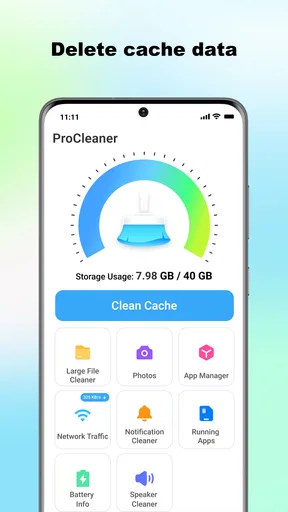
The home screen features a big, inviting button to begin the cleaning process. You don’t have to navigate through layers of menus, which is a huge plus. The app also provides a quick overview of your storage status, which is both informative and a bit alarming if you’re a digital hoarder like me.
Features You’ll Love
One of the standout features of ProCleaner is its powerful cleaning capability. It intelligently scans your device for junk files, cache, and unnecessary data that’s just taking up space. The scanning process is quick, and it provides a detailed report of what’s been found. No more guessing games about what’s clogging up your storage.
Another cool feature is the duplicate file finder. I had no idea how many duplicate photos and files I had until I ran this tool. It’s like finding hidden treasure, except it’s just freeing up precious storage space. The app lets you review duplicates before deleting, which is great because you might want to keep some duplicates for nostalgia or backup purposes.
User Experience
Using ProCleaner is a breeze. The navigation is intuitive, and the app doesn’t slow down your phone, which is a complaint I often have with other cleaning apps. I didn’t experience any crashes or bugs during my time using it, making it pretty reliable.
One thing I particularly appreciate is the lack of intrusive ads. There are some, but they’re not overwhelming or disruptive. This is a major win because, let’s be honest, nobody likes being bombarded with ads when trying to clean their phone.
Does It Really Work?
Now, the million-dollar question: does ProCleaner actually make a difference? In my experience, yes, it does. After running a full clean, I noticed a significant amount of storage space was freed up. My phone felt a bit snappier, and I had more space for the things that matter, like more apps and photos.
Of course, the effectiveness of the app will depend on how cluttered your phone is to start with. But for me, it was like a breath of fresh air. A digital declutter, if you will.
What to expect before switching
If you already use your phone’s own storage manager, switching does not need to mean abandoning it. I would keep the built-in view for understanding which apps and categories are taking space, and use ProCleaner when I want a more direct scan-and-review workflow. This makes the two approaches complementary rather than competing: one helps with broad diagnosis, while the other is convenient for a focused cleanup session.
There is also a small habit cost. Any new utility takes a moment to learn, and a cleaner is only useful if its suggestions are understandable enough to act on. I would start cautiously, review what it identifies, and avoid making a sweeping deletion just to see a larger number disappear. If I find myself repeatedly checking the same clutter without gaining useful space, I would stop and manage the biggest files manually instead.
Who should choose it—and who should pass
This is a sensible option for someone who wants a simple cleanup route and is comfortable reviewing suggested files before removing them. It may be especially handy for a phone owner who does not remember to check storage until an everyday task runs into a warning. On the other hand, people who want detailed folder-by-folder control, or who are already comfortable managing storage through their device settings, may prefer to stay with the built-in tools.
ProCleaner is available free, is rated for Everyone, and runs on Android 7.0 or later. It has a 4.0 average from around 6,200 ratings, with more than five million installs; the current version is 1.1.8. Those figures suggest it has reached a broad audience, but they do not tell me whether its cleanup suggestions will be useful on a particular phone. My own decision would still come down to whether its workflow feels clearer than the storage tools I already use.
Final Thoughts
Overall, I’d say ProCleaner - Storage Cleaner is worth a try if you’re dealing with storage issues. It’s straightforward, effective, and doesn’t get in the way with unnecessary features. While it might not have all the bells and whistles of some other apps, it excels in what it’s designed to do: clean your phone’s storage efficiently. So, if you’re tired of those pesky storage warnings, give it a go and see if it can give your phone the spring cleaning it deserves.
My recommendation is to treat it as a convenient assistant, not a substitute for deciding what matters on your phone. Use its scan to find a manageable next step, check the files before deletion, and turn to the phone’s own storage settings when the real issue is a handful of large items. If that balance suits the way you work, this focused cleaner is easy to consider; if you want complete manual control or a fix for every performance problem, another approach will serve you better.
Pros
- Efficiently clears cache to free up space.
- User-friendly interface for easy navigation.
- Boosts device speed with one-tap cleaning.
- Customizable cleaning options available.
- Supports multiple languages for global users.
Cons
- May display intrusive ads during use.
- Occasional false prompts for unnecessary cleaning.
- Limited features in free version.
- Requires frequent updates for optimal performance.
- Some features need internet connectivity.
FAQs for ProCleaner - Storage Cleaner
What is ProCleaner and how does it work?
ProCleaner is an app designed to optimize your device's performance by cleaning unnecessary files and managing storage efficiently. It scans your device for junk files, cache, and unused apps, allowing you to free up space with a single tap. This results in faster device performance and improved battery life.
Is ProCleaner safe to use on my device?
Yes, ProCleaner is safe to use. It does not delete any important files or data from your device. The app only targets junk files and cache that are no longer needed. Additionally, it provides detailed information before any file deletion, ensuring you have control over what gets removed.
Does ProCleaner support both Android and iOS devices?
ProCleaner is available for both Android and iOS platforms. It is designed to work seamlessly across different devices, offering customized cleaning solutions for each operating system. Users can download it from Google Play Store for Android or the App Store for iOS devices.
Are there any subscription fees or in-app purchases in ProCleaner?
ProCleaner offers both free and premium versions. The free version provides basic cleaning features, while the premium version unlocks advanced options such as scheduled clean-ups and deep cleaning. Users can choose between monthly or annual subscriptions for the premium features, with pricing details available in the app.
How often should I use ProCleaner to maintain my device's performance?
For optimal performance, it's recommended to use ProCleaner at least once a week. Regular cleaning helps in maintaining storage space and ensures your device runs smoothly. However, you can adjust the frequency based on your usage patterns and device performance needs.


